

Facility leaders and safety managers understand that hazards are present wherever and whenever work is being done. The art, and science, of safety management begins with the identification of these hazards so that controls can be put in place and risks can be mitigated. Improved incident reporting leads to better safety outcomes by reducing risk, increasing incident visibility, and enabling faster response to potential hazards.
Unfortunately, there are often incident reporting obstacles that keep safety observations, near misses, and even EHS incidents from ever being reported. This under-reporting can cause “blind spots” in workplace safety programs and open the door to serious incidents and injuries.
Removing obstacles to incident reporting should, therefore, be a top priority of safety leaders. Simplifying reporting processes, such as using QR codes to simplify reporting for employees, increases employee engagement and leads to improved safety outcomes. Fortunately, doing so can be accomplished with a mix of thoughtful processes, training, and supporting technologies, making incident reporting easier.
The changing face of safety technology
Safety managers have more tools at their disposal than ever before. Many organizations are investing in drone technology to reduce the need for some hazardous activities or wearable technologies that notify workers of nearby hazards. To help reduce under-reporting of safety concerns, the supporting technologies are usually simpler and more familiar. For example, many organizations provide reporting portals via computer kiosks throughout their facilities.
These kiosks allow any employee or contractor to quickly report incidents and observations, anonymously or otherwise, with a few clicks. The system enables users to submit reports through an incident form, supporting both named and anonymous reporting. Kiosks can provide simple instructions that help to ensure reports are complete and accurate. Additionally, their presence throughout the facilities serves as a constant reminder that reporting of safety concerns is an expectation and central to the organization’s safety culture.
As mobile devices have become more common in the workplace, safety leaders have embraced them as a way to stay connected with their frontline workers. Mobile devices allow for easy access to information and real-time communication, but adoption of mobile apps throughout the workforce often has its own hurdles. When it comes to reporting of safety observations and EHS incidents, utilizing the mobile device’s native browser (such as Safari on Apple devices or Google Chrome on Android devices) is often the fastest and easiest way to submit information.
Incident Reporting Software
Dakota Software’s Scout product uses a browser-based approach for mobile reporting that allows anyone, even those without user accounts, to report safety issues. Users do not need an account to access the incident form, supporting anonymous reporting and making the process accessible to all. The implementation of such a system is straightforward and does not require complex setup.
Once the reporting URL is accessed, usually by clicking an email link, it can be bookmarked in the browser, a process most people are familiar with. Reporters can even add an app-like icon to the device’s Home Screen to simplify future reports. But what if someone wants to report an issue but doesn’t have access to the reporting URL? That’s where QR Codes come in, and incident reporting software can further streamline the process…


Smarter Safety Starts at the Source
Empower every employee to report incidents, track investigations, and improve safety outcomes with no login required.

Using QR codes is easier than you think
While the QR code has been around for more than twenty years, adoption of Quick Response (QR) codes has been relatively slow among EHS leaders and in incident management software. That’s likely because the use cases for QR codes are diverse and creating them can be somewhat confusing.
While QR code use cases are still plentiful, including many ‘read-only’ scenarios such as scanning a QR codeto access a Safety Data Sheet or equipment usage checklist, creating them is now very simple. Scanning QR codes at a job site or site provides employees with instant access to relevant incident forms and safety information, streamlining reporting and improving safety management.
There are many free sites for creating QR codes, just search “free QR code generator.” Many of these free QR code generating sites, however, will attempt to get you to sign up for a newsletter or try to upsell you beyond a trial version. To avoid this hassle, you can use Google Chrome to simply create a QR code that, when scanned, will take people directly to that web page. Microsoft Edge offers an Add-on to create QR codes.
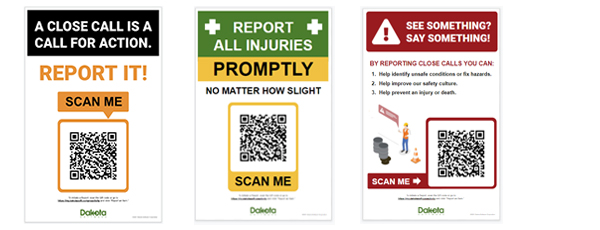
Creating QRs is one thing. Positioning them in a way that they are clear and accessible to your workers may require some creativity. Dakota provides our clients with QR posters that can be displayed wherever work is being done or where workers congregate. These posters usually include popular safety slogans, such as “SEE SOMETHING? SAY SOMETHING!!” or “A CLOSE CALL IS A CALL FOR ACTION,” and include simple instructions. Some organizations also choose to print QR codes on stickers or patches that can be adhered to equipment or personnel.
In those scenarios, it’s important that the intent of the QR code is clearly stated along with the code itself. Clear communication on QR posters ensures employees understand their purpose and how to use them for safety and incident reporting.
After a QR is created and posted, personnel simply need to scan it using the camera available on their mobile phone or tablet (note that some older devices may require a special QR app). Once the device recognizes the code, it will open the related web page in the device’s default browser. The user can then enter the issue details by typing or using the device’s “talk to text” feature. It’s that simple!
For Dakota clients: To create a QR code for your reporting portal, just click the “Report an Item” button on your login page then follow the instructions above (depending on which browser you are using). If you prefer to use a different method of creating a QR code, just copy and paste your “Report an Item” web page URL into the QR generator of your choice. If you need a hand, contact us at support@dakotasoft.com.
After a QR is created and posted, personnel simply need to scan it using the camera available on their mobile phone or tablet (note that some older devices may require a special QR app). Once the device recognizes the code, it will open the related web page in the device’s default browser.
The user can then enter the issue details by typing or using the device’s “talk to text” feature. Scanning QR codes can also capture location data, helping track where incidents occur within operations and providing valuable context for safety management. Additionally, scanning QR codes enables real time access to reporting tools for employees, ensuring immediate data availability and faster response. It’s that simple!
For Dakota clients: To create a QR code for your reporting portal, just click the “Report an Item” button on your login page then follow the instructions above (depending on which browser you are using). If you prefer to use a different method of creating a QR code, just copy and paste your “Report an Item” web page URL into the QR generator of your choice. If you need a hand, contact us at support@dakotasoft.com.
Reporting of safety issues is just the beginning
Capturing information about unsafe behaviors and conditions is only the first step in incident reporting and incident management. There are many, many benefits of using software to digitize your safety reporting processes. Digital systems help organizations track safety incidents, response times, and the effectiveness of safety protocols, ensuring that issues are addressed promptly and thoroughly.
First and foremost, email alerts and notifications, triggered by new incident reports, keep safety leaders informed of issues so they can act quickly. Once an incident is reported, teams can collaborate and document their related activities, including Root Cause Analysis (RCA) investigations and Corrective Action follow-through. Consolidating injury data can also greatly simplify OSHA 300 log exports and reporting to OSHA’s online Injury Tracking Application (ITA).
Speaking of OSHA, their Severe Violator Enforcement Program concentrates inspection resources on employers who demonstrate indifference to safety obligations. But their analysis is no longer limited to the four walls of a single establishment – using its own modern data analysis tools, OSHA is now able to look more aggressively across the entire organization. T
Tracking and analyzing data not only improves compliance but also enhances operational efficiency by streamlining safety management processes. Incident reporting software reduces errors, such as data entry mistakes and duplicate records, and supports better health and safety outcomes. EHS and safety leaders without the same capability are at a considerable disadvantage.
Commercial EHS software, like Dakota Scout, lets organizations analyze EHS data across their locations, regions, and business units, providing a real-time, 360 degree view of their entire safety program. Using Scout’s data exploration tools, EHS leaders can identify trends and subtle correlations in their safety data so they can take action and demonstrate their ongoing commitment to safety.
A comprehensive solution can help organizations manage safety incidents, improve overall health and compliance, and ensure that safety protocols are consistently followed across all operations.
Incident Management Software Is A Call Away
Organizations with strong safety cultures rely on good communication between frontline workers and safety leaders to help identify and take action on safety issues. The use of QR codes can greatly simplify observation, near miss, and incident reporting and improve the quantity and quality of data. The more safety information that is collected, the more insights safety leaders have into areas of concern, such as incident reporting, incident response and overall EHS performance.
You’ve made it this far, don’t stop now! To see how Dakota’s incident management software can enhance your organization’s safety program, click this link to watch a short demo video. Or, if you’re reading this on a desktop or laptop and have your mobile device handy, just scan the QR code below. It’s that easy!